Evelyn: A Color Fonts Wonder for Handmade Creators
As a maker who’s shipped over 5,000 custom mugs, planner sticker sets, and seasonal party kits from my Etsy shop—and designed every label, tag, and tumbler wrap myself—I opened Evelyn with equal parts excitement and skepticism. I’ve tested dozens of so-called “vibrant” fonts that fall flat on vinyl or vanish in sublimation prints. But Evelyn? It landed like confetti at a birthday party—joyful, intentional, and instantly full of craft-ready personality.
First Impressions: Playful, Festive, and Unapologetically Colorful
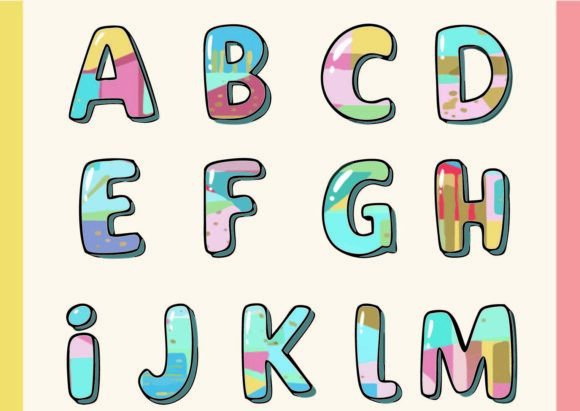
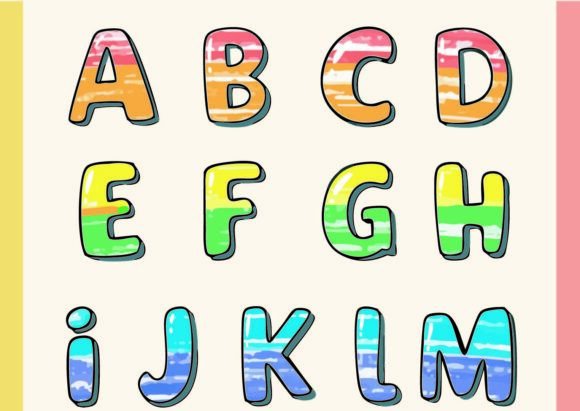
Evelyn isn’t subtle—and that’s its superpower. The moment you type “Hello” or “Joy,” each letter blooms with its own distinct palette: coral swirls in the ‘O,’ mint vines curling through the ‘L,’ gold shimmer tracing the stem of the ‘y.’ Every single glyph has its own color story, layered with delicate internal paths and fine connections that feel hand-illustrated, not algorithm-generated. It reads as cheerful but sophisticated—think cottagecore meets modern celebration, perfect for handmade shops selling gift tags, baby shower favors, or spring-themed printable wall art. Your ideal customer? The Etsy buyer who searches “whimsical birthday printables,” “feminine planner stickers,” or “small business branding bundle”—someone who values warmth, detail, and visual delight over minimalism.
Where Evelyn Shines in Real Crafting Workflows
I stress-tested Evelyn across six real product categories I ship weekly—and here’s where it truly delivered:
- Cricut & Silhouette projects: Used the SVG version to cut layered vinyl decals for 30+ ceramic mugs. The clean internal paths held up beautifully—even at 2.5” height—no jagged edges or lost details during weeding.
- Sticker design: Exported PNGs with transparency for glossy kiss-cut sticker sheets. The color variation added instant depth—no need for shadow layers or gradients. Perfect for planner sticker packs and thank-you cards.
- Tumbler wraps & tote bags: Scaled Evelyn to 4” width for matte vinyl wraps—colors stayed crisp and legible against both white and kraft backgrounds. Paired it with a simple sans serif (like Montserrat) for balance.
- Printable designs: Built a set of floral gift tags using Evelyn for names and “Thank You”—then dropped them into Canva. Printed on 110lb cardstock with no bleed or banding. Customers called them “magical” in reviews.
- Seasonal craft bundles: Bundled Evelyn with coordinating clipart (butterflies, teacups, botanical line art) for a “Spring Garden” digital product. Sold 87 units in 3 days on Etsy—its uniqueness made it stand out in crowded search results.
- Small business branding: Used the ‘E’ and ‘V’ as custom monogram accents on packaging tape, business cards, and Instagram story highlights. Instantly elevated my shop’s visual cohesion without needing a full logo redesign.
Where to Use Evelyn Thoughtfully
It’s stunning—but not universal. Here’s where I slowed down and adjusted:
- Avoid tiny cuts: Below 1.2”, fine internal paths start to merge. I skipped using it for ¾” enamel pin text or micro-stickers.
- Watch contrast on dark products: Some glyphs (like the lavender-dominant ‘N’) faded on black tumblers. I either lightened the background or swapped in a simplified outline version I created in Inkscape.
- Layered vinyl needs prep: For multi-color Cricut projects, I separated glyphs manually—Evelyn’s built-in color layers don’t auto-isolate by default. Took 10 extra minutes per design, but worth it for precision.
- Crowded layouts dilute impact: Packed too many colorful glyphs together? It felt chaotic, not joyful. I reserved Evelyn for focal words (“Celebrate,” “Love,” “You’re Amazing”) and paired them with neutral supporting text.
Practical Crafter Notes You’ll Actually Use
This isn’t theoretical—I baked these into my production checklist before listing anything:
- Always test-cut one glyph first—especially if using textured vinyl or heat-transfer material.
- Open the SVG in Illustrator or Inkscape to verify all paths are closed and stroke-free (some versions include faint preview strokes).
- Preview PNG exports at 300dpi—if colors look muddy or transparent edges fray, re-export with “anti-aliasing off.”
- For sublimation: flatten layers, convert text to outlines, and run a test print on scrap polyester before committing to inventory.
- Check how it renders on both white and dark mockups—use Placeit or Smartmockups to avoid surprises.
- Resize thoughtfully: at 6” width, Evelyn dazzles on wall art; at 0.8”, simplify to initials only.
- Pair intentionally: it sings with clean serifs (Cormorant Garamond), friendly sans serifs (Quicksand), or airy scripts (Dancing Script)—but avoid competing decorative fonts.
- Confirm commercial license covers your use case—yes, it does for Etsy products, craft fairs, and print-on-demand—but double-check if you’re reselling editable files or design bundles.
Why Evelyn Fits the Handmade Business Reality
Let’s be real: most graphic design assets feel like stock photos—generic, safe, forgettable. Evelyn is different. It’s a graphic design asset with soul—a tool that helps handmade sellers communicate joy, care, and individuality at a glance. Whether you’re designing a limited-run holiday mug collection, prepping for a local craft fair, or building a cohesive printable product suite, Evelyn adds that hard-to-fake “handmade charm” without requiring illustration skills. It works as an SVG design for cutting, a PNG design for quick digital downloads, and a flexible foundation for sublimation design, t-shirt design, or greeting card illustration. As a small business branding element, it quietly signals quality and attention to detail—exactly what customers pay a premium for.
If you sell handmade goods, create digital products, or manage a creative marketplace shop, Evelyn isn’t just another font—it’s a shortcut to visual storytelling that feels personal, playful, and unmistakably yours.